A stealer log is the complete data harvest that information-stealing malware pulls from an infected device: saved passwords, browser cookies, session tokens, autofill, and crypto wallets, bundled and sold in bulk on dark web markets. They're more dangerous than a leaked password because a stolen session cookie can bypass a login entirely, including two-factor authentication.
- A stealer log is everything malware could pull from one device
- Session cookies are the crown jewel — they bypass logins and 2FA
- Infection usually comes from cracked apps or fake downloads
- One infected device can expose every account it signed into
- Defence: don't run untrusted files; unique passwords; treat infection as total exposure
“Stealer logs” has moved in a few years from niche jargon to a defining feature of the modern dark web economy. If you want to understand why breaches feel constant — and why changing one password often isn't enough — this is the mechanism to understand.
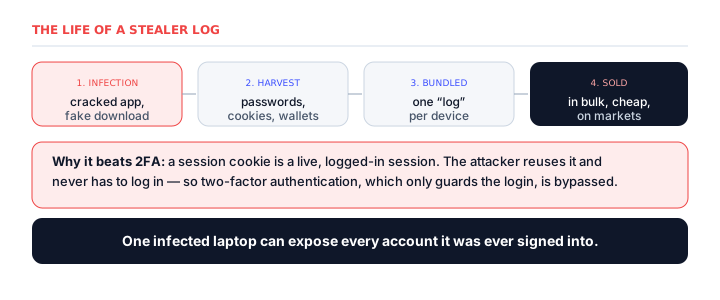
What's in a stealer log
Information-stealing malware (“infostealers”) has one job: land on a device, scrape everything of value, and send it home. Packaged as a single log per device, that's saved passwords, autofill data, browser cookies and session tokens, cryptocurrency wallets, and system details. It's not one password — it's the digital contents of a person's browser, sold as a set.
Why a cookie beats your 2FA
A password is a claim you make at the login door; a session cookie is proof you already walked through it. Steal the cookie and an attacker loads it into their browser and simply is you — already logged in, no password needed. That's why 2FA can be bypassed: it guards the login, but a stolen session was authenticated before it was stolen.
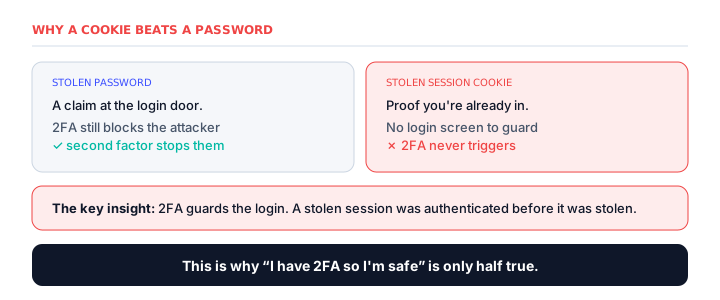
This distinction is worth dwelling on, because it overturns the advice most people rely on. We're all told that two-factor authentication makes accounts safe — and against a stolen password, it does: the attacker hits the login screen, is asked for the second factor, and is stopped. But a stealer log often contains something better than a password: a live session. With a stolen session cookie, the attacker never sees the login screen at all, so the second factor is never requested. “I have 2FA, so I'm safe” turns out to be only half true — it's true for passwords, and false for sessions.
How devices get infected
Infostealers are almost always invited: a cracked or pirated app bundled with malware, a fake download, a malicious attachment or browser extension, or a phishing link. The root cause is running a file you shouldn't — which is why “don't run untrusted downloads” is the single most valuable habit in personal security.
Why stealer logs matter so much now
Stealer logs have quietly become one of the most consequential threats on the dark web, for a simple reason: they're cheap, plentiful, and devastating. A single infection can yield hundreds of credentials, and logs are sold in enormous bulk collections for very little. That economics is what makes them a foundation of the modern criminal ecosystem — the raw material that initial access brokers refine into corporate network access, which ransomware crews then buy.
This is why a stealer log matters far beyond the individual whose device was infected. When that person used a work laptop, or logged into a corporate system from a personal machine, their harvested credentials can become the entry point for an attack on their employer. One person installing a cracked game at home has, more than once, been the first link in a chain that ended in a company-wide ransomware incident. The humble stealer log is where personal security and enterprise security turn out to be the same thing.
What protects you
- Don't run untrusted software — cracked apps and fake downloads are the top infection route.
- Use unique passwords via a manager so one harvested login can't open your other accounts.
- Keep 2FA on — it still defeats far more common password-only theft.
- If you suspect infection, treat it as total exposure: change passwords from a clean device and log out all sessions to invalidate stolen cookies.
Frequently asked questions
What are stealer logs?
The full data harvest that information-stealing malware pulls from an infected device — saved passwords, browser cookies, session tokens, autofill, and crypto wallets — bundled per device and sold in bulk on dark web markets.
Why are stealer logs dangerous if I have 2FA?
Because they often include session cookies, which represent an already-authenticated login. An attacker loads your session token and is logged in as you without seeing the login screen — and 2FA only guards the login, not an existing session.
How do devices get infected by infostealers?
Almost always by running something untrusted: a cracked or pirated app bundled with malware, a fake download, a malicious attachment or extension, or a phishing link. Avoiding untrusted downloads is the most effective defence.
What is the difference between a stealer log and a data breach?
A breach leaks data from one company's servers. A stealer log is scraped from one person's infected device and contains everything across all the sites they used — passwords, cookies, wallets — often far more dangerous per victim.
What do I do if my data is in a stealer log?
Treat it as total exposure. From a clean device, change your passwords and log out all sessions everywhere to invalidate stolen cookies. Use unique passwords via a manager, and check whether the device is still infected.
How much do stealer logs cost on the dark web?
Very little — they're sold in bulk, often for a few dollars per log or in large subscription collections. That low price and high volume is exactly what makes them so dangerous: a cheap, plentiful supply of working credentials that feeds fraud, account takeover, and corporate intrusions.
Can stealer logs affect a business?
Yes, seriously. If an employee's device is infected — even a personal one used for work — their harvested corporate credentials can become the entry point for an attack. Stealer logs are the raw material initial access brokers refine into network access sold to ransomware crews.
How do you know if you're in a stealer log?
It's hard to know directly, since logs are traded privately. Breach-notification services increasingly flag stealer-log exposure, but the safest assumption after any suspected infection is total exposure: change passwords from a clean device, log out all sessions to kill stolen cookies, and enable 2FA everywhere.